16 Practical FastAPI Lessons from Production: Performance, Scaling, and Reliability
Granian, msgspec, streaming uploads and multi-worker pitfalls, plus 12 more lessons from running live products and building my own.
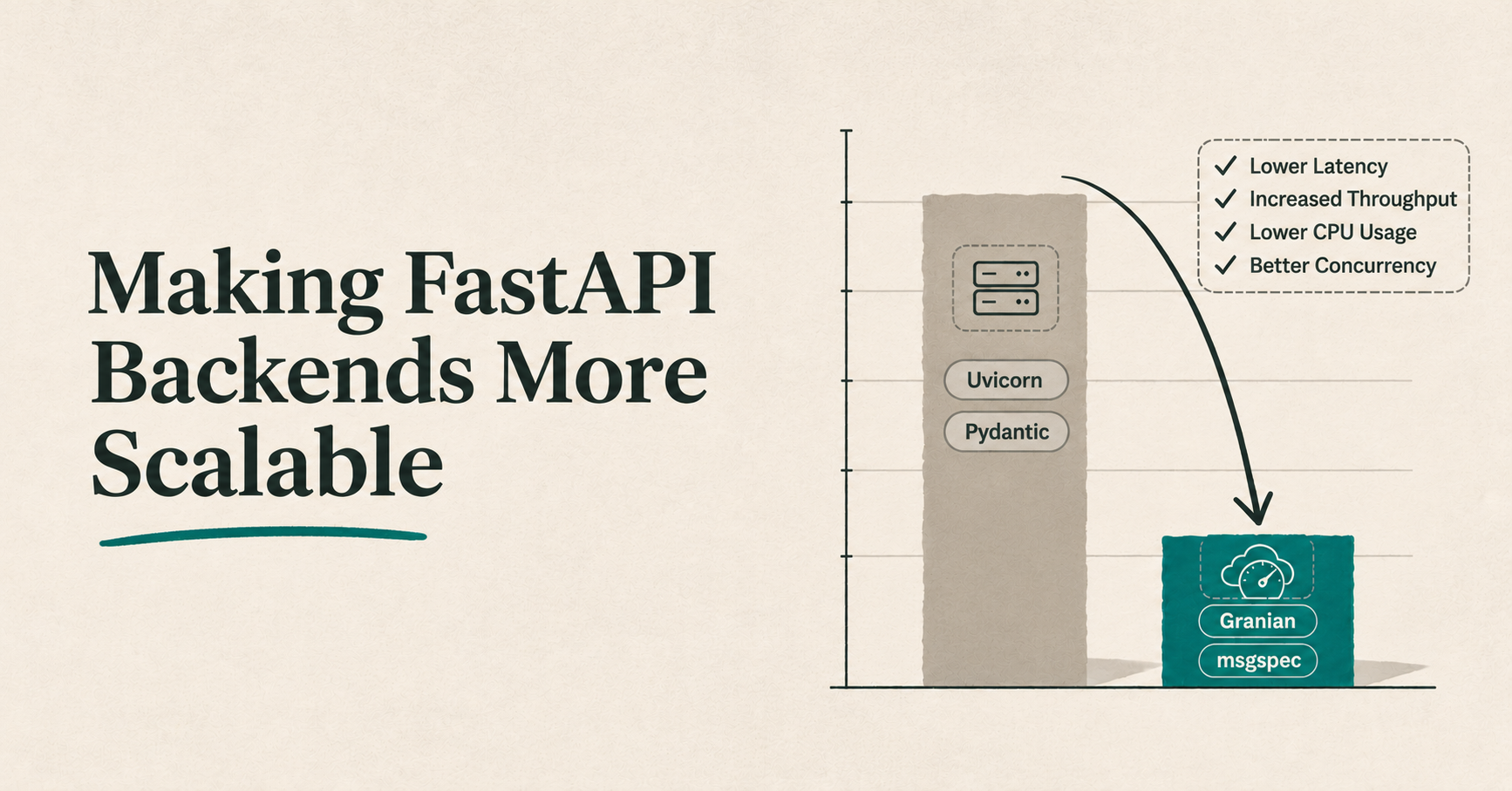
After working on several production projects and building my own, I wanted to share what I’ve learned about making FastAPI backends more scalable and better at handling load.
Most FastAPI guides cover the basics: using async correctly, avoiding blocking I/O, caching, batching database calls, offloading work to a thread pool, and moving background work to a worker. This guide focuses on library and code-level optimizations that can make your backend blazingly fast.
Note: No optimization guide can promise magic results when another bottleneck remains. Backends are mostly I/O-bound, so these changes will not help if your queries are unoptimized, you have N+1 queries, you use async improperly, or your code has other inefficiencies.
This guide may be a bit bigger than usual, so take your time. cries in attention span
1. Is it time to leave Uvicorn?
I've been fanboying over Granian lately. On one project, I wondered whether the server itself added to the cost, beyond the usual advice to “use async.” That led me to compare Uvicorn and Granian.
Granian is a Rust-based HTTP server for Python applications. It serves FastAPI through ASGI, so switching from Uvicorn does not require rewriting your app. Its runtime, built on Hyper and Tokio, handles network I/O before passing application work to Python. Uvicorn runs its server code in Python, while Granian handles more HTTP work in Rust. This can reduce server overhead and improve performance under concurrency when the server is the bottleneck. Projects such as paperless-ngx, Reflex, SearXNG, and Weblate use Granian in production, as do organizations including Microsoft, Mozilla, and Sentry.
Both servers pass requests to the same FastAPI ASGI application; their server-side implementations differ:
Recently my project handled a workload I recorded as 400,000 events per minute. I collected these results under heavy load.
Note: These tests were run locally while I load-tested my project, before deploying it.
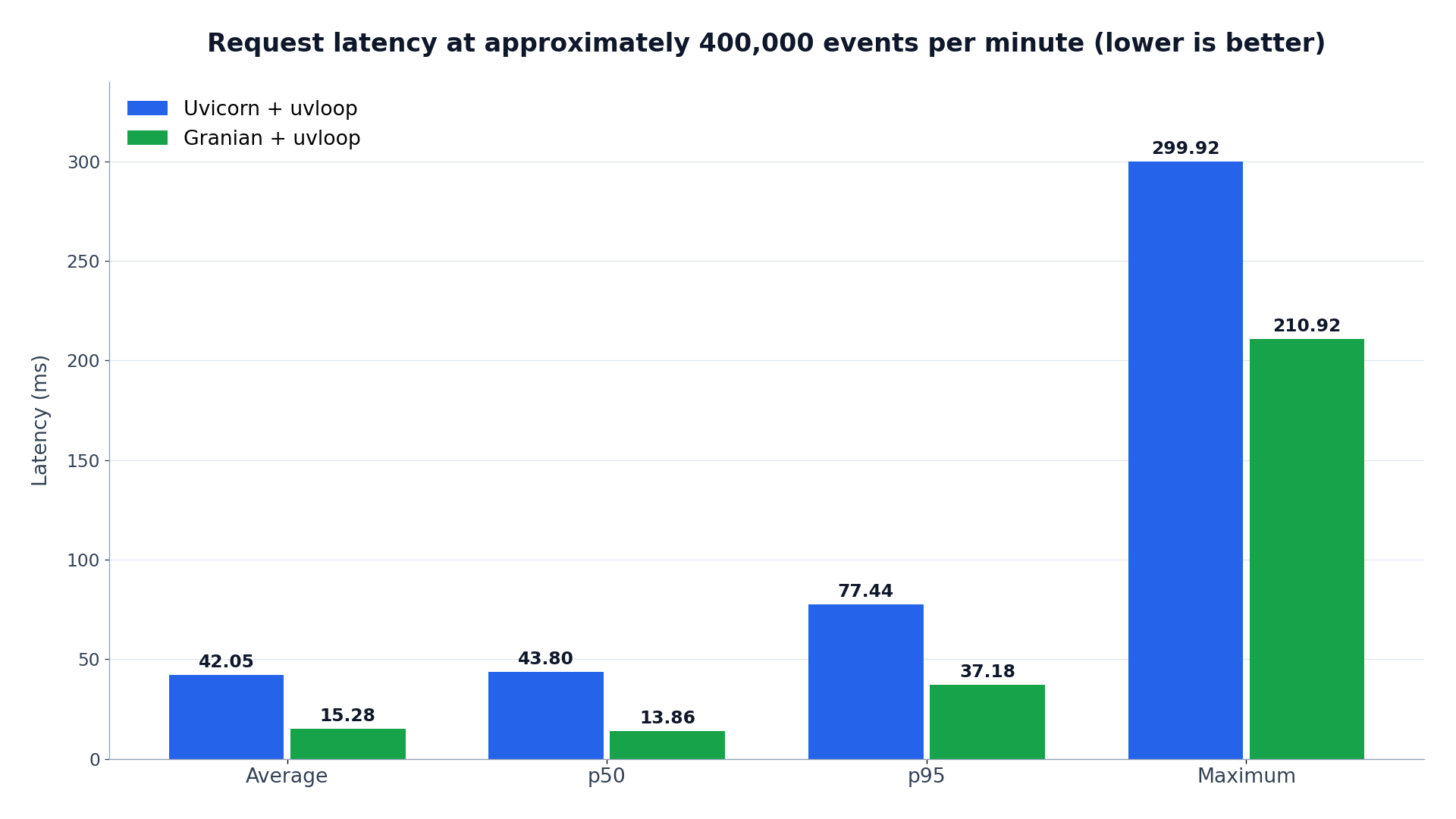
I first tested the FastAPI app with Uvicorn + uvloop, then switched to Granian + uvloop without changing the application code or ASGI interface. Both k6 runs used the same script, worker concurrency, and payload size, and handled approximately 400,000 events per minute. Average latency dropped from 42.05 ms to 15.28 ms, median latency from 43.80 ms to 13.86 ms, and p95 latency from 77.44 ms to 37.18 ms, while accepted event rates remained similar.
On my setup, Granian + uvloop lowered average latency by 63.66%, median latency by 68.36%, p95 latency by 52.02%, and maximum latency by 29.67% compared with Uvicorn + uvloop. CPU use fell roughly 10 to 15%, and both runs had 0 failed requests.
The workload was not primarily I/O-bound. The API accepts events into an in-memory buffer and publishes them to Redpanda, while Kafka consumers independently persist them to PostgreSQL. Database hits occur only when cached, verified API keys expire every two minutes and need revalidation. These results may differ on another machine or application.
You can take a look at my project mentioned above: Vortex.
Install and run Granian
On Linux, install Granian with its uvloop extra and serve the FastAPI object named app in main.py:
python -m pip install "granian[uvloop]"
granian --interface asgi --loop uvloop --workers 4 main:app
Four workers is an example, not a recommendation for every machine. Granian defaults to one worker; choose and load-test the count for your deployment.
Fix Granian reload loops
If Granian keeps reloading, kills workers, or does not reload code, install reload support and watch your application directory. A common cause is watching the virtual environment: changes to its Python symlinks can be detected as application changes and trigger an endless reload loop.
pip install "granian[reload]"
granian --reload --reload-paths /app \
  --reload-ignore-dirs env .venv __pycache__ node_modules \
  --workers 1 --workers-kill-timeout 1
If you run Granian in Docker and it does not detect file changes, enable polling:
WATCHFILES_FORCE_POLLING: "true"
WATCHFILES_POLL_DELAY_MS: "300"
For more details, see Granian, issue #470, and the watchfiles documentation.
If you stay with Uvicorn
On Linux, FastAPI guides commonly recommend Uvicorn with uvloop and httptools, and it is still worth trying. uvloop replaces Python’s default asyncio event loop.
python -m pip install "uvicorn[standard]"
uvicorn main:app --loop uvloop --http httptools --workers 4
In my comparison, Uvicorn with uvloop still had lower raw throughput than Granian.
A faster server cannot negotiate with a slow query on your behalf.
uvloop does not support Windows. Since most production servers run Linux, this is unlikely to affect production deployments.
On Windows, you can use Winloop with both Uvicorn and Granian. Granian supports it with --loop winloop; Uvicorn needs a custom Python setup because its standard --loop option does not include Winloop.
2. Give msgspec a try
msgspec combines serialization with typed decoding and validation. Its Struct types let the decoder construct and validate an object in one pass.
The Litestar framework also uses msgspec by default, much like FastAPI uses Pydantic: Litestar GitHub repository.
In one of my recent projects, Pydantic added significant overhead. Switching only the high-volume events module to msgspec reduced CPU usage by another 10 to 12%. Msgspec models did not provide automatic docs in my FastAPI setup, so I wrote a separate api_docs.py for those endpoints. I think 10 to 15 lines of API docs are worth the performance msgspec gave me.
Msgspec can bring speed and financial benefits when strict type validation is enough. Pydantic is slower because it includes a “large toolbox”, complex custom validation decorators, and automatic OpenAPI and JSON Schema generation.
Use Pydantic for user-facing CRUD endpoints, where rich error messages matter, and msgspec for high-volume, performance-critical paths such as internal microservice communication or large batch processing.
This small example defines a message type and decodes JSON directly into it:
import msgspec
from fastapi import FastAPI, HTTPException, Request, Response

app = FastAPI()

class Event(msgspec.Struct):
    event_id: int
    name: str
    tags: list[str]

decoder = msgspec.json.Decoder(Event)
encoder = msgspec.json.Encoder()

@app.post("/events")
async def create_event(request: Request):
    try:
        event = decoder.decode(await request.body())
    except msgspec.DecodeError as exc:
        raise HTTPException(status_code=422, detail=str(exc)) from exc
    return Response(content=encoder.encode(event), media_type="application/json")
3. Use orjson religiously
After discovering orjson, I forgot Python even had a built-in json module. It is roughly 4× to 10× faster than Python’s built-in json module for serialization (dumps) and deserialization (loads), and it works better for my use cases. I use it to serialize data for Redis caches and to send events with a Kafka producer.
orjson.dumps() serializes a Python object into JSON and returns UTF-8 bytes. orjson.loads() accepts JSON as bytes, bytearray, memoryview, or str and returns Python objects. You can pass dumps() output straight to loads() without decoding it into a string first.
This example serializes an event, then parses the bytes back into Python data:
import orjson

event = {"event_id": 7, "name": "created", "tags": ["api"]}
payload = orjson.dumps(event)
print(type(payload))  # <class 'bytes'>

decoded_event = orjson.loads(payload)
print(decoded_event["name"])
If you already use msgspec, you may not need orjson. Msgspec can be even faster than orjson and handle the same work.
4. Stream large uploads and responses
Loading a large file entirely into memory makes memory use grow with the file and can exhaust the worker's available memory.
I ran into this with a CSV upload in one of my projects. For that use case, I streamed the upload in 64 KiB chunks instead of loading it into one Python object. The endpoint checked the content type, enforced MAX_UPLOAD_BYTES, and aborted ingestion if processing failed or the client disconnected. I ran the tests in staging, not locally, with files around 1 to 2 GB and recorded a demo run of about one million rows. I published customer records to Kafka in side batches and wrote them to the database in batches of 14,000 records, about 72 database batch operations for one million rows.
A general approach
Choose between in-memory streaming and object storage based on file size, request time limits, worker memory, and whether you need to retry or resume processing.
Stream and process in memory
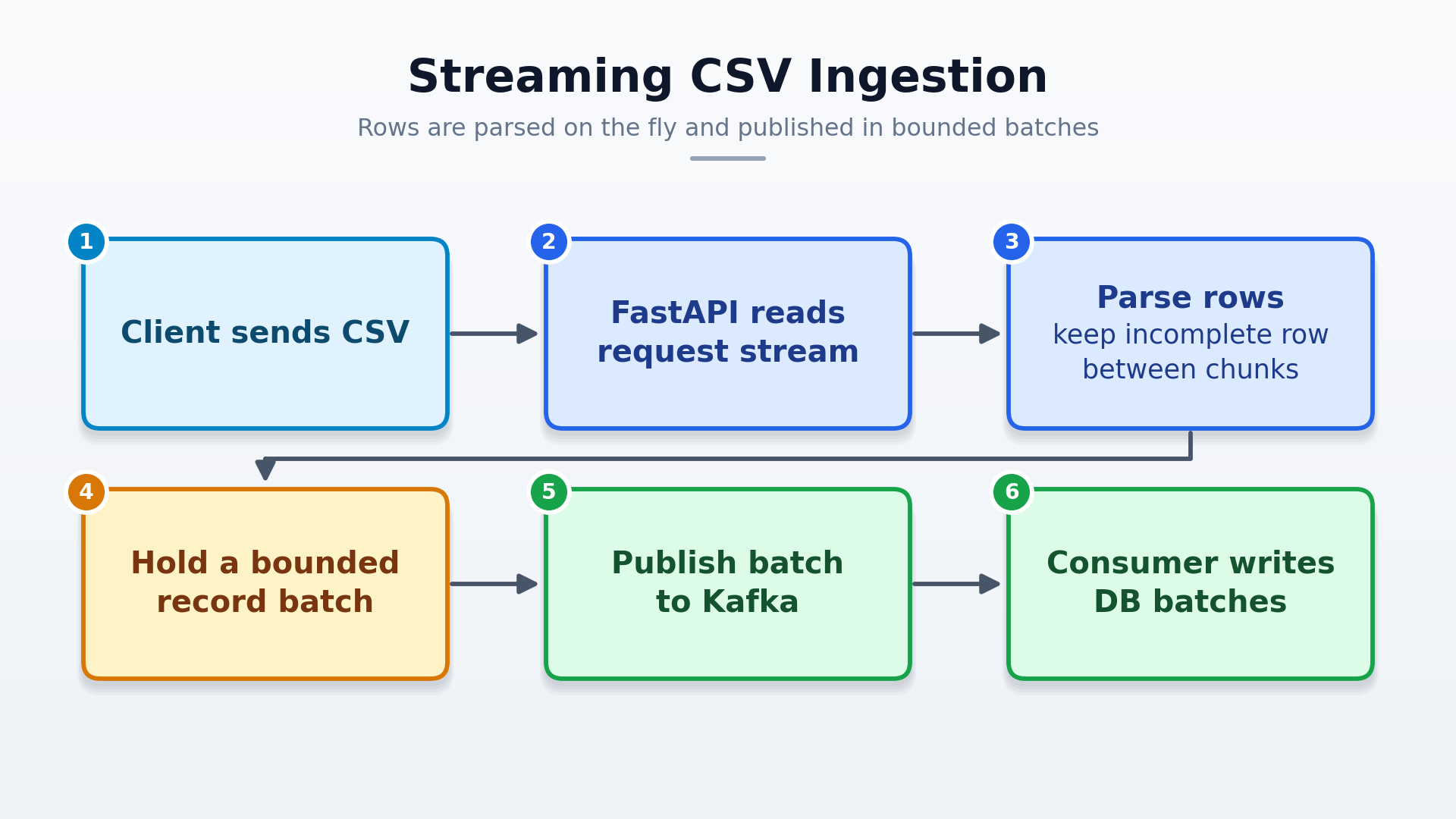
The API parses incoming chunks and holds only the current chunk, any incomplete row, and a bounded record batch. Await each write to Kafka or the database to apply backpressure when the destination is slow. This avoids a temporary copy, but each active upload uses API worker capacity and keeps the request open until processing finishes. Set an upload limit and make partial work safe to retry.
Upload to object storage and process in a worker
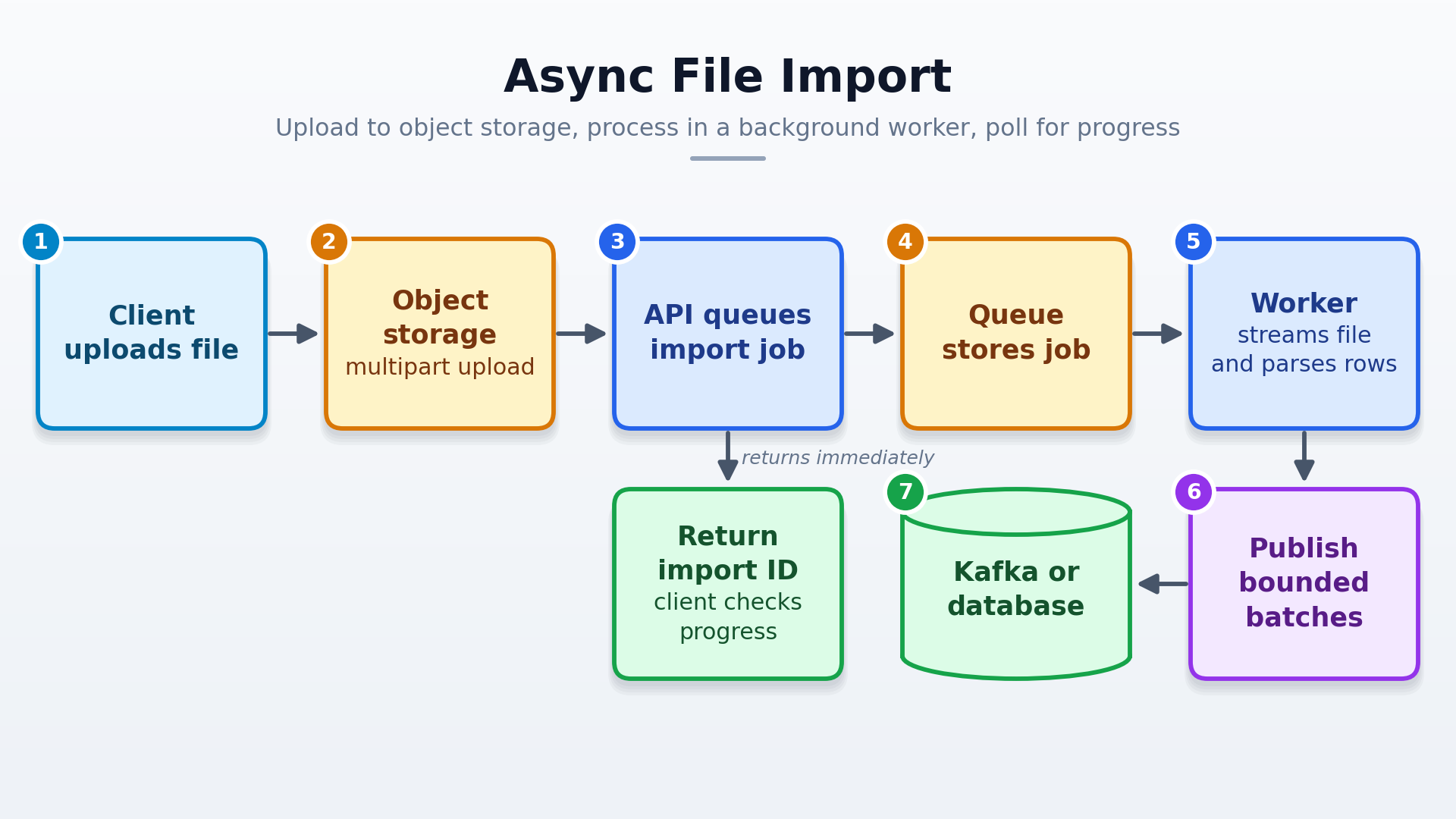
For larger files or imports that may outlast an HTTP request, upload to an object storage service and queue a job for a worker. The worker streams and parses the file, then publishes bounded batches. The API can return an import ID so the client can check progress. This adds storage and job-management work, but separates upload duration from processing. For large files, multipart uploads let individual parts be retried independently. Use a queue and worker to process the import asynchronously, and make retries idempotent because a job may be processed more than once.
For large responses, yield each chunk when it is ready, and handle client disconnects and backpressure.
This example shows only the in-memory upload path. settings, csv_parser, validate, and kafka are application-specific configuration or adapters. Add import tracking, retry, idempotency, and cleanup handling for your failure-recovery needs.
import os

from fastapi import FastAPI, HTTPException, Request

app = FastAPI()
MAX_UPLOAD_BYTES = int(os.environ["MAX_UPLOAD_BYTES"])
CHUNK_SIZE = settings.csv_chunk_size
BATCH_SIZE = settings.kafka_batch_size


@app.post("/imports/csv")
async def import_csv(request: Request):
    content_type = request.headers.get("content-type", "").split(";", 1)[0]
    if content_type != "text/csv":
        raise HTTPException(status_code=415, detail="Expected text/csv")

    total = 0
    batch = []
    parser = csv_parser()

    async for incoming in request.stream():
        total += len(incoming)
        if total > MAX_UPLOAD_BYTES:
            raise HTTPException(status_code=413, detail="Upload too large")

        for offset in range(0, len(incoming), CHUNK_SIZE):
            chunk = incoming[offset:offset + CHUNK_SIZE]
            for row in parser.feed(chunk):
                batch.append(validate(row))
                if len(batch) >= BATCH_SIZE:
                    await kafka.publish_batch(batch)
                    batch = []

    for row in parser.finish():
        batch.append(validate(row))

    if batch:
        await kafka.publish_batch(batch)

    return {"status": "accepted"}
5. Multi-worker FastAPI: caches and scheduled jobs
Each FastAPI worker is a separate process with its own memory, application instance, and event loop. Workers do not share caches or schedulers, and each loads its own copy of large in-memory caches or models. Adding workers increases total memory use.
Common process-local caches include:
functools.lru_cache: stores function results in the current process.cachetools: provides in-memoryLRUCacheandTTLCacheimplementations.aiocache: provides async cache options, includingSimpleMemoryCache.
Use these caches for data that can stay in one process. A miss or update in one worker does not affect the others. Use Redis or Memcached when workers need shared cache data.
For example, Worker 1 may update a user's settings and clear its local cache while Worker 2 continues serving the old copy until it expires or is evicted. A short TTL limits staleness but does not invalidate other workers' copies. For settings that must stay consistent, use a shared cache and invalidate its key after the database update commits. An in-progress read can still write old data back; use a short TTL or versioned key if that race matters.
In-memory caches fit small, recomputable data that can be worker-specific or briefly stale. Avoid them for settings, permissions, or shared data that must update immediately. Workers warm their caches separately, so a cold or expired key can send several workers to the database at once. Restarts clear a worker's cache. Set a size limit where supported; with lazy expiration, a TTL may not free memory immediately.
FastAPI startup and lifespan code runs in every worker. Starting APScheduler or another cron scheduler there starts one scheduler per worker, so jobs can run more than once or race while updating shared data. An asyncio.Lock cannot coordinate workers because each process has its own lock and event loop.
Run the scheduler in a separate process or use a leader lock. Each worker tries to acquire the same exclusive lock at startup; only the lock holder starts the scheduler. This example uses a POSIX file lock, which coordinates workers on the same host when they use the same lock-file path:
import fcntl
import os
from contextlib import asynccontextmanager
from pathlib import Path

from fastapi import FastAPI

LOCK_PATH = Path("/tmp/my-fastapi-scheduler.lock")


def try_acquire_leader_lock():
    lock_file = LOCK_PATH.open("a+")
    try:
        fcntl.flock(lock_file, fcntl.LOCK_EX | fcntl.LOCK_NB)
    except BlockingIOError:
        lock_file.close()
        return None
    return lock_file


def start_scheduler():
    ...  # Start your application's scheduler here.


def stop_scheduler():
    ...  # Stop your application's scheduler here.


@asynccontextmanager
async def lifespan(app: FastAPI):
    lock_file = try_acquire_leader_lock()
    is_leader = lock_file is not None
    scheduler_started = False

    try:
        if is_leader:
            print(f"LEADER pid={os.getpid()} - start scheduler")
            start_scheduler()
            scheduler_started = True
        else:
            print(f"FOLLOWER pid={os.getpid()} - skip scheduler")

        yield
    finally:
        if lock_file is not None:
            try:
                if scheduler_started:
                    stop_scheduler()
            finally:
                try:
                    fcntl.flock(lock_file, fcntl.LOCK_UN)
                finally:
                    lock_file.close()


app = FastAPI(lifespan=lifespan)
If you save the example in main.py, run it on Linux with multiple workers, for example:
uvicorn main:app --workers 4
Any worker may become leader after a restart. This example has no failover, so followers do not take over if the leader exits. Add retries or an election mechanism, or run the scheduler separately.
All workers must share the lock file. A local /tmp file coordinates workers on one host, not across containers or hosts. For those setups, use a shared lock service such as Redis or a scheduler designed for multi-process coordination. File locks are POSIX-specific. Distributed locks need an expiry and owner-safe release. Make jobs idempotent because a crash may cause side effects to repeat on a later run. Multiple APScheduler instances need shared storage and an event broker configured for your APScheduler version.
6. Profile bottlenecks with pyinstrument or fastapi-profiler
A profiler helps locate time in Python code; it does not replace load testing or query analysis. Use Pyinstrument to profile a specific function or code block. For request-level profiling, fastapi-profiler provides middleware built on Pyinstrument and is the more direct starting point. Install it with:
python -m pip install fastapi-profiler
Add the middleware to your FastAPI app to print a profile for each request:
from fastapi import FastAPI
from fastapi_profiler import PyInstrumentProfilerMiddleware

app = FastAPI()
app.add_middleware(PyInstrumentProfilerMiddleware)
Profile a representative operation, not a placeholder too short to sample. Limit profiling in production; it adds overhead and can expose execution details.
7. Pydantic at the boundary, lighter structures inside
Use Pydantic at API boundaries for validation and response filtering. Its performance guide says Pydantic is not a bottleneck in most cases and recommends optimizing only after measurement. For high-volume internal transformations, measure whether a dataclass or another lightweight structure helps.
Dataclasses can be faster to create because their generated initializer assigns field values without checking or converting them. Pydantic parses and validates values when creating a model, which helps ensure API input matches the model's types. After boundary validation, converting data to a dataclass can avoid validating it again. Creating thousands of Pydantic objects during a request can add significant latency, though you may not notice unless your endpoints handle heavy workloads.
The example validates input with Pydantic, converts it to an internal dataclass, then contrasts that approach with using Pydantic throughout:
from pydantic import BaseModel
from dataclasses import dataclass

# Good - Pydantic for API validation
class UserRequest(BaseModel):
    name: str
    email: str
    age: int


# Good - Dataclass for internal processing
@dataclass
class UserInternal:
    name: str
    email: str
    age: int
    created_at: datetime
    processed: bool = False


@app.post("/users")
async def create_user(user_request: UserRequest):
    # Pydantic validates the incoming request

    # Convert to internal dataclass for processing
    user = UserInternal(
        name=user_request.name,
        email=user_request.email,
        age=user_request.age,
        created_at=datetime.utcnow()
    )

    # Do internal processing with lightweight dataclass
    process_user(user)

    return {"id": user.id}


# Bad - Using Pydantic everywhere
class UserPydantic(BaseModel):
    name: str
    email: str
    age: int
    created_at: datetime
    processed: bool = False


def process_user(user: UserPydantic):
    # Every object creation/access pays validation overhead
    updated_user = UserPydantic(
        **user.dict(),
        processed=True
    )
    return updated_user
8. Async endpoints, blocking calls, and thread-pool limits
FastAPI awaits async def path operations directly and runs synchronous def operations and dependencies in a thread pool. A blocking call inside an async def handler still blocks its event loop; adding async does not make the underlying library asynchronous.
The example compares the same blocking call in an async route and a sync route:
import time

from fastapi import FastAPI

app = FastAPI()


def blocking_lookup():
    time.sleep(1)  # Represents a blocking synchronous library call.
    return {"ok": True}


@app.get("/blocks-event-loop")
async def blocks_event_loop():
    return blocking_lookup()


@app.get("/uses-thread-pool")
def uses_thread_pool():
    return blocking_lookup()
Use an async driver with await when one is available. For blocking synchronous libraries, a normal def endpoint lets FastAPI dispatch through the pool. Move CPU-heavy or long jobs to a worker system when the architecture calls for one.
Starlette’s default AnyIO thread-pool capacity is 40 tokens, shared with other uses of that pool. This is a capacity limit, not a promise that 40 threads are always free for endpoints. Increasing it can also increase memory use and contention, so profile and measure before changing it.
9. WebSocket handling: prefer async iteration when it fits
For a simple WebSocket receive loop, Starlette’s iter_text(), iter_bytes(), and iter_json() methods let you process messages with async for. The iterator ends when the client disconnects, so you do not need an endless while True loop just to receive messages.
Use iter_text() when the client sends text messages:
from fastapi import FastAPI, WebSocket

app = FastAPI()


@app.websocket("/ws")
async def websocket_endpoint(websocket: WebSocket) -> None:
    await websocket.accept()
    async for message in websocket.iter_text():
        await websocket.send_text(f"Received: {message}")
For binary messages, use iter_bytes() and send bytes back with send_bytes(). For JSON messages, use iter_json() and respond with send_json().
With a manual while True loop, handle WebSocketDisconnect around the receive operation. Put cleanup for connection-owned resources in a finally block. Use the manual loop when you need custom disconnect handling:
from fastapi import FastAPI, WebSocket, WebSocketDisconnect

app = FastAPI()


@app.websocket("/ws/manual")
async def websocket_manual(websocket: WebSocket) -> None:
    await websocket.accept()
    try:
        while True:
            try:
                message = await websocket.receive_text()
            except WebSocketDisconnect:
                break
            await websocket.send_text(f"Received: {message}")
    finally:
        # Clean up connection-owned resources here, if any.
        pass
10. Use lifespan for resource setup; keep app.state for shared state
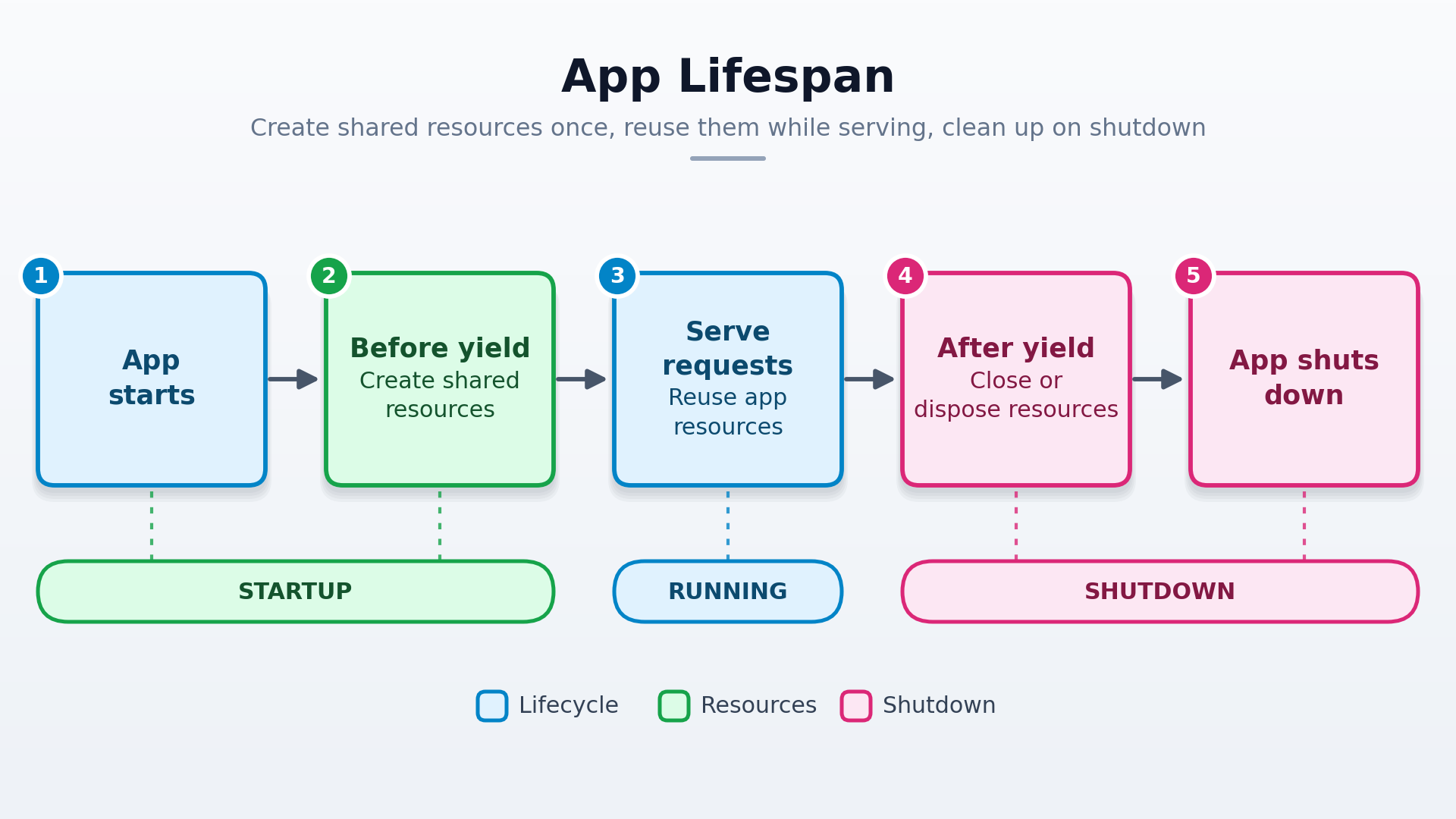
Use FastAPI’s lifespan handler to initialize resources before the app accepts requests and release them at shutdown. Usually, keep a database engine and connection pool for the app’s lifespan, and use a database session for a shorter request or transaction. Code before yield runs once before the app serves requests, so shared resources such as a pool or model can be prepared and reused. Code after yield runs during shutdown, after request handling, so resources can be closed or disposed of where they were created. This keeps setup and cleanup in one async context manager.
app.state still holds application-level state. Lifespan manages resource lifecycles; it does not replace app.state. FastAPI and Starlette also expose lifespan state to requests. Choose the mechanism based on how each value is owned and accessed.
The older @app.on_event("startup") and @app.on_event("shutdown") handlers still work in existing apps, but FastAPI marks them as deprecated. Prefer lifespan in new code. Do not combine the approaches: when a lifespan handler is configured, the startup and shutdown event handlers are not called.
Lifespan lifecycle:
from contextlib import asynccontextmanager
from fastapi import FastAPI
from sqlalchemy.ext.asyncio import create_async_engine

@asynccontextmanager
async def lifespan(app: FastAPI):
    engine = create_async_engine("postgresql+asyncpg://user:pass@localhost/db")
    app.state.engine = engine
    yield
    await engine.dispose()

app = FastAPI(lifespan=lifespan)
11. Scope dependency caching to the right lifetime
Use dependency injection to make resource ownership visible. FastAPI caches a repeated dependency within one request by default; this is different from a process-wide cache.
Use functools.lru_cache for settings that should be created once, not for database sessions. Create and dispose the engine in lifespan, and open and close sessions at the request or transaction boundary. Caching get_session() would reuse a session across requests instead of creating and closing it at the intended boundary.
This example caches settings and creates each database session within its intended scope:
from functools import lru_cache
from sqlalchemy.orm import Session


@lru_cache
def get_settings():
    return Settings()


# Do not put @lru_cache on this dependency.
def get_session():
    with Session(engine) as session:
        yield session
Settings and engine come from your application configuration.
Dependency injection is powerful, but each layer should have a clear job. If the dependency graph hides what an endpoint needs, split the logic or call a plain function directly. Great power and a great number of parameters can arrive together.
12. Don’t overuse middleware: use routers and custom exception handlers
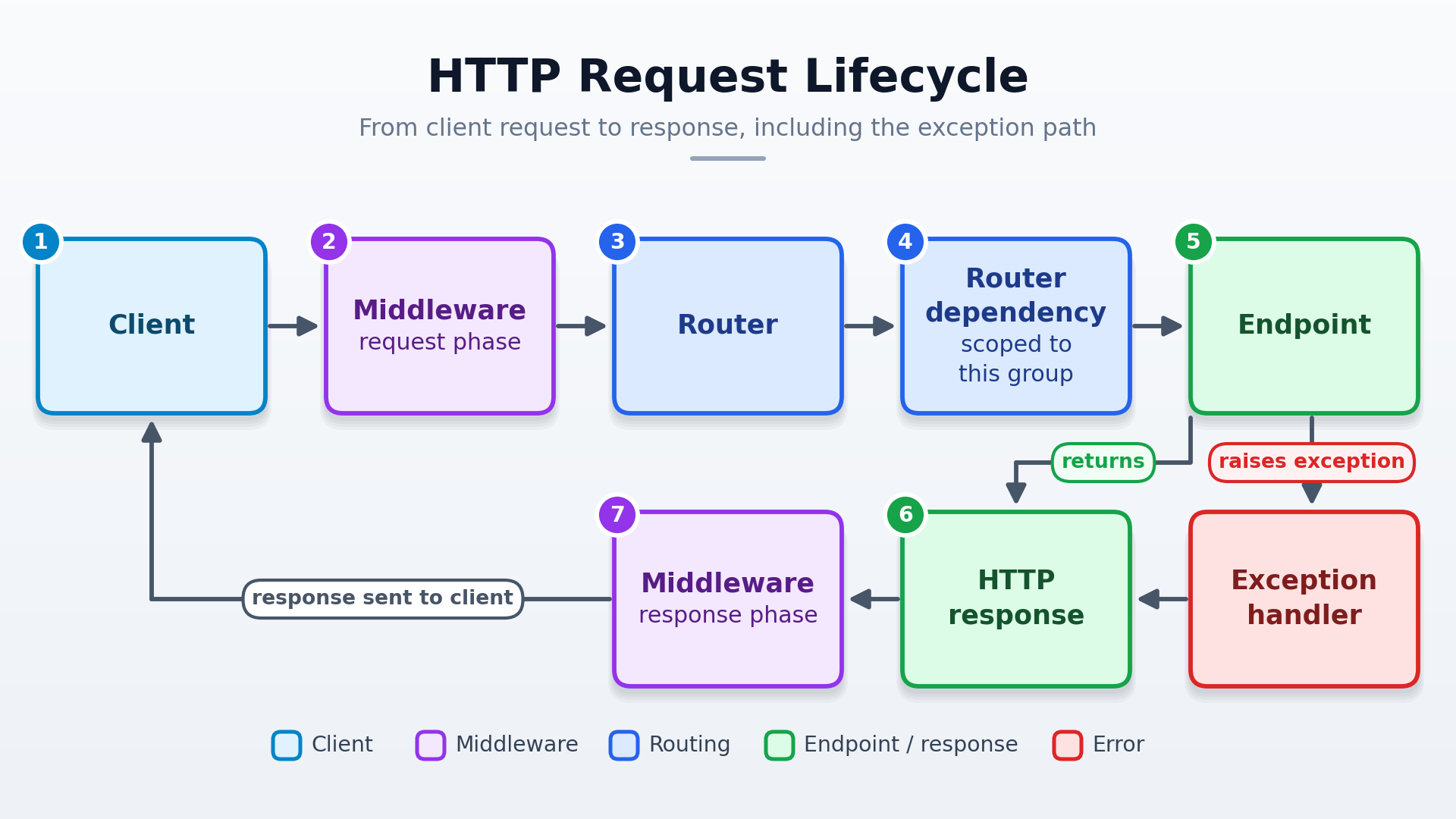
Use exception handlers when the app needs a consistent error envelope. Keep HTTP status codes accurate, preserve useful validation details, and do not return internal exception text to clients. Use routers and router-level dependencies for rules that apply to a group of endpoints. Use middleware for behavior around the request/response cycle. Choose based on scope, not on a claim that one layer is always faster.
The request path looks like this:
For example, apply an authorization dependency to an admin router and register one handler for the app’s HTTP errors:
from fastapi import APIRouter, Depends, FastAPI, Request
from fastapi.responses import JSONResponse
from starlette.exceptions import HTTPException as StarletteHTTPException

app = FastAPI()


async def require_admin() -> None:
    ...  # Replace with the application's authorization check.


admin = APIRouter(prefix="/admin", dependencies=[Depends(require_admin)])


@admin.get("/reports")
async def reports():
    return {"reports": []}


@app.exception_handler(StarletteHTTPException)
async def handle_http_error(request: Request, exc: StarletteHTTPException):
    return JSONResponse(
        status_code=exc.status_code,
        content={"message": exc.detail, "status_code": exc.status_code},
    )


app.include_router(admin)
The dependency runs for admin-router endpoints, and the exception handler formats HTTP errors across the app. Middleware surrounds the whole request/response path for behavior that should apply across routes.
13. Use GZip middleware where it helps
GZip helps reduce network transfer for larger text or JSON responses. Compression uses CPU and may add latency without much benefit for small or already-compressed payloads, or when the service is CPU-bound. Starlette’s GZipMiddleware skips responses below minimum_size and does not compress already-encoded content, partial responses, server-sent events, or common already-compressed media types.
Add the middleware once when creating the FastAPI app. The example uses a 1,000-byte threshold; measure representative responses and adjust it for your workload.
from fastapi import FastAPI
from starlette.middleware.gzip import GZipMiddleware

app = FastAPI()
app.add_middleware(GZipMiddleware, minimum_size=1000)
GZip middleware also supports streaming responses and compresses each chunk as it is sent. Small chunks may compress less efficiently; larger batches can improve the compression ratio but delay delivery. Choose based on whether throughput or prompt chunk delivery matters more for the endpoint.
Use GZip when large, compressible responses make network transfer a bottleneck. Measure CPU, latency, and response size to check whether it helps.
14. Hide API docs deliberately
If API consumers do not need public docs, disable Swagger UI, ReDoc, and the OpenAPI schema in production. Docs map the API’s routes and schemas; keep them internal or protected if your team still needs them.
Set these options when creating the production app:
from fastapi import FastAPI

app = FastAPI(
    docs_url=None,
    redoc_url=None,
    openapi_url=None,
)
This only hides the documentation endpoints; it does not secure API routes. Protect those with authentication, authorization, and input validation.
Project and database workflow
15. Use Alembic with an async template
I've seen projects using an async PostgreSQL driver add a synchronous driver just for migrations, leaving them with a second database driver to maintain. Alembic runs migrations through its migration API, and its official async template adapts an async SQLAlchemy engine for the job. Try alembic init -t async migrations.
16. Learn a project structure that fits
A clear router, schema, model, and service layout does not directly make an endpoint faster, but it can make performance work easier to find and maintain. No single structure fits every project. Borrow ideas, keep dependencies flowing in one direction, and avoid turning this guide into a second post about architecture.
I think a distributed monolith or modular monolith can be a starting point; understand how it is designed and the principles behind it.
The Netflix Dispatch repository is also an example I love, and you can check it out here: Netflix Dispatch.
A joke
Well done making it this far! To lighten your mood, here's a joke:
A SQL query walks into a bar, approaches two tables, and asks:
“Can I join you?”
Key takeaways
- Measure the bottleneck before choosing an optimization.
- Choose server, serialization, and streaming approaches to fit the workload.
- In multi-worker apps, account for separate caches and schedulers, and manage resources within their intended lifetimes.
Comments
Join the discussionGreat one!